
South East Customers - How to fix connection issues with your Nokia modem?
If you are a Community Fibre South East customer and have a Nokia All-in-One modem that has a solid link light, but the internet light is flashing, please try the following troubleshooting steps:
-
Connect to your router via a wired or wireless connection, ignoring the "no internet" warning.
-
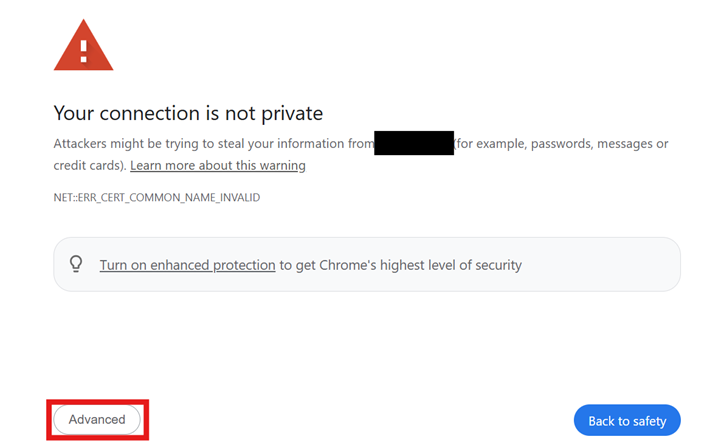
Go to: 192.168.1.254 - This may then present you with a warning screen, but it is safe to proceed.
-
Click ‘Advanced’ in the bottom left of this message.
-
Then click ‘Proceed to 192.168.1.254 (unsafe)’ button.
-
You will then see the login screen.
a. The username is case-sensitive, and must be entered exactly as: AdminGPON
b. The password is: ALC#FGU
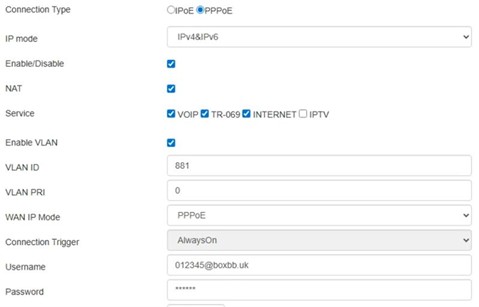
- Once logged in, go to Network >WAN. Set the details exactly as below and as shown in the screenshot.
a. Connection Type: PPPOE
b. IP mode: IPv4&IPv6
c. Username: UPRN@boxbb.uk (if you are unsure of your UPRN number, please contact us)
d. Password: Juniper
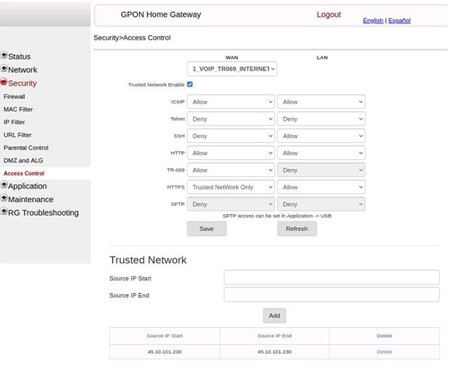
- Go to Security > Access Control. Set the details exactly as below and as shown in
a. Tick the box for “Trusted Network Enable”
b. Set the HTTPS dropdown to “Trusted Network Only”
c. Click Save
d. Scroll down, set both source IP start and source IP end both to 45.10.101.230
e. Click Add.
f. Click Save again.